

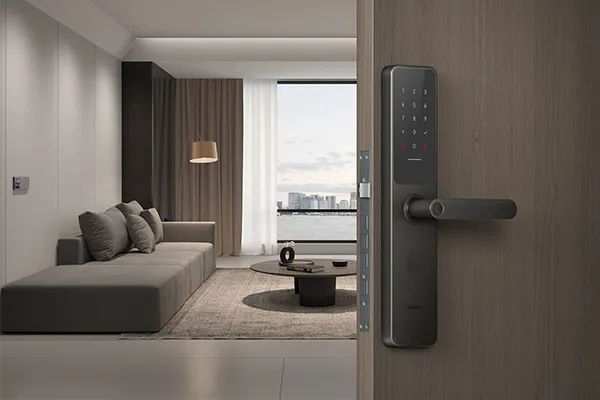
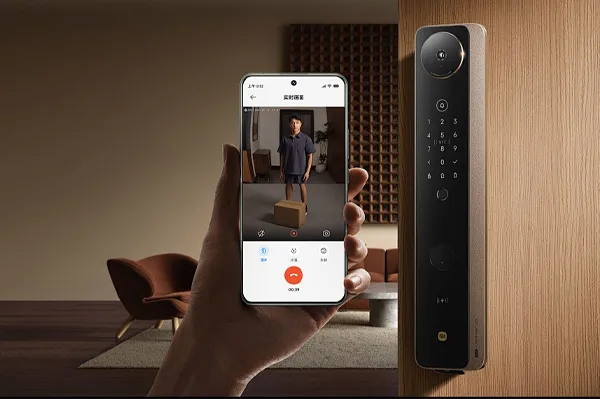
If you’re still fumbling for keys or seeking to add a layer of security powered by technology to your home, a smart lock might be the perfect next step in upgrading your living space. Before making a decision, this comprehensive beginner’s guide will answer all your questions and help you take the first step into a smarter lifestyle.
What is a Smart Lock? How Does It Redefine “Opening a Door”?
At its core, a smart lock is an electronic access control system that replaces or supplements traditional mechanical keys with electronic technology and digital authentication. It’s more than just a “lock”; it’s an intelligent access management system.
A typical smart lock usually features one or more of the following unlocking methods:
- Biometric Recognition: Such as fingerprint scanning, utilizing your unique biological traits.
- Digital Keypad: Entering a pre-set passcode on a touch panel.
- Physical Credentials: Like encrypted key cards or NFC wristbands.
- Mobile Control: Unlocking via smartphone Bluetooth, Wi-Fi, or NFC.
- Mechanical Key: A retained physical backup for emergency access.
The fundamental difference from traditional locks is that a smart lock transforms the “key” from a physical object into information or identity, revolutionizing the experience of access.
Why Switch to a Smart Lock? Four Core Advantages Explained
1. Unparalleled Convenience
- Say Goodbye to Keys: No more worries about forgetting, losing, or searching for keys. Your fingerprint, passcode, or phone becomes your key.
- Easy Access Granting: When family members come home late, friends visit, or cleaners need access, you can easily provide entry via temporary passcodes or remote authorization, eliminating the need to hand over keys or wait at home.
- Effortless Entry: Come home with your hands full of shopping bags? A simple fingerprint press opens the door for a smooth, hassle-free experience.
2. Layered Security Enhancement
- Anti-Picking Design: Most high-quality smart locks use the highest security grade Class C Lock Cylinders, offering significantly longer resistance to forced entry and lock-picking than traditional locks.
- Anti-Peeping Feature: The keypad unlocking supports a “false password” function, allowing you to input any random numbers before and after the correct code to prevent onlookers from memorizing it.
- Proactive Security Alerts: Abnormal unlocking attempts (like forced prying or multiple incorrect passcodes) trigger immediate alarms and send notifications to your phone app.
- Access History Log: See exactly who entered and at what time right in your app, which is especially useful for families with children, housekeepers, or tenants.
3. Efficient Guest Management
A smart lock turns you into the “administrator” of your home. You can assign different access levels:
- Permanent Access: For family members.
- Scheduled Access: For regular cleaners (e.g., valid every Wednesday 10 AM-12 PM).
- One-Time Access: For visiting friends or repair personnel.
Permissions can be added or revoked anytime—no need to change the lock or collect keys.
4. Smart Home Integration
For smart home enthusiasts, the smart lock can act as a trigger for automated scenes. For example:
- Lights in the hallway and living room turn on automatically the moment you unlock the door.
- Activating “Away Mode” at night arms the whole-house security system as you lock up.
- In “Leave Home” mode, locking the door simultaneously turns off the AC and closes the curtains.
Installing a Smart Lock: A Three-Step Prep Guide & Professional Process
Pre-Purchase Self-Assessment
Before buying, check these three points:
- Door Type and Material: Most smart locks fit common wooden doors, security doors, and metal doors. For glass doors, double doors, or doors with special structures, consult customer service for compatibility.
- Door Swing Direction: Whether the door opens left or right, inward or outward, affects the lock’s installation orientation.
- Existing Lock Measurements: It’s best to measure key dimensions of your current lock (like the distance from the center of the lock bolt to the door edge, lock body length and width), or take clear photos of the lock from the front and side. Customer service can then help determine compatibility.
Standard Installation Process (Typically Done by Professionals)
- Removal: Safely remove the old lock.
- Positioning & Drilling: Precisely mark and drill holes in the door according to the new lock’s template.
- Install Lock Body & Panels: Secure the lock body and connect the interior and exterior panels with the connecting rod and cables.
- Function Testing: Install batteries, test all unlocking methods, and guide you through initial setup (like registering admin fingerprints, setting a passcode).
- On-Site Tutorial: Ensure you fully understand daily use, adding users, and emergency procedures.
We strongly recommend opting for professional installation services provided by the brand rather than DIY, to ensure precision and protect your warranty.
Choosing Your First Smart Lock: Five Key Selection Criteria
With numerous products on the market, following these guidelines will help you make a wise choice:
1. Security is Fundamental
- Lock Cylinder Grade: Prioritize Class C Lock Cylinders, the highest residential security grade in many markets.
- Fingerprint Sensor: Choose capacitive fingerprint sensors (live detection) over optical sensors to prevent fake fingerprint spoofing.
- Electromagnetic Interference Protection: Ensure the lock has design features to guard against electromagnetic pulse attacks (e.g., from “Tesla coils”).
2. Stability and Battery Life are the Foundation
- Power Source: Mainstream battery-powered models (typically 4-8 AA batteries) are generally more stable and reliable, often lasting over a year.
- Low-Battery Alerts: Ensure it has multiple low-battery warnings (app notifications, voice prompts).
- Emergency Power: A backup USB-C/Micro-USB port for temporary power from a power bank is an essential “lifesaver” in critical moments.
3. Choose Features Based on Needs, Avoid Overbuying
- Basic Family Needs: A combination of Fingerprint + Passcode + Mechanical Key covers 99% of daily requirements.
- Remote Management Needed: Choose models with built-in Wi-Fi or compatible with a Bluetooth gateway for remote access logs and creating temporary passcodes.
- Rental or Vacation Property: Temporary and scheduled passcodes are core features.
- Advanced Needs: Consider models with facial recognition or robust smart home ecosystem integration.
4. Design and Quality Details
- Panel Material: Zinc alloy or aircraft-grade aluminum are common high-quality choices, offering durability.
- User Interface: Try the keypad feel and responsiveness in person or via video reviews.
- Display & Feedback: Clear visual displays and voice prompts are more user-friendly for children and the elderly.
5. Brand and Service Support
- Reputable Brand: Choose brands specializing in security or smart locks for better quality and support.
- Installation & After-Sales: Confirm the availability of free professional installation, nationwide service coverage, and warranty terms (typically 2-3 years).
- Warranty & Insurance: Some brands offer theft protection insurance, adding an extra layer of security.
Post-Installation Usage and Maintenance Tips
- Regular Battery Checks: Even with low-battery alerts, check battery contacts every six months to prevent corrosion from leakage.
- Store Spare Keys Securely: Keep a backup mechanical key in a trusted location outside your home (e.g., workplace or parents’ house) for emergencies.
- Clean Sensors Regularly: Gently wipe the fingerprint sensor and keypad with a soft, dry cloth to maintain sensitivity.
- Monitor Door Alignment: If the door becomes hard to open or close, it might be due to door sagging misaligning the bolt and strike plate. Adjust the hinges, not the lock itself.
Take Your First Step into Smart Living
Upgrading to a smart lock is more than a simple hardware change; it’s the beginning of embracing a more convenient and intelligent lifestyle. It solves the primitive frustrations of physical keys and gives you unprecedented control over your home’s access.
As a first-time user, we recommend starting with a reliable, feature-focused mid-range model from a reputable brand with excellent service. You’ll soon discover that security and freedom have never been more accessible.
Ready to start your key-free life? Explore our smart lock series designed for first-time users, each offering free professional measurement and installation. Click here to learn more.